Top 7 Infrastructure as Code Open-Source Tools for 2023

1. TFLint
TFLint is an open-source infrastructure as code linter tool that helps developers and DevOps teams identify potential issues and errors in their Terraform code by checking the Terraform configuration files for best practices, coding standards, and policy compliance.
Aside from providing a streamlined method for testing and validating Terraform code, it also offers feedback on syntax errors, incorrect resource configurations, and security vulnerabilities. Plus, users can create custom rules and plugins to enforce their organization’s specific coding standards and policies.
Features of TFLint
Possibility to add custom rules
It makes it easier to implement best practices across the organization
Identifies and remediates issues
Offers a custom AWS rule set for AWS users
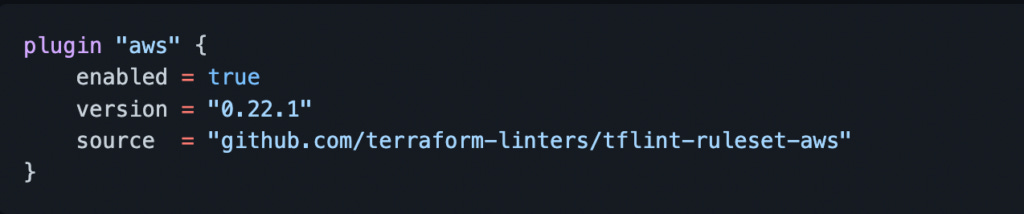
If you provision resources in AWS, you can find a custom AWS ruleset in this GitHub repository. It focuses on possible error detection and best practices when managing resources in AWS with Terraform. Here is how to enable the AWS plugin:
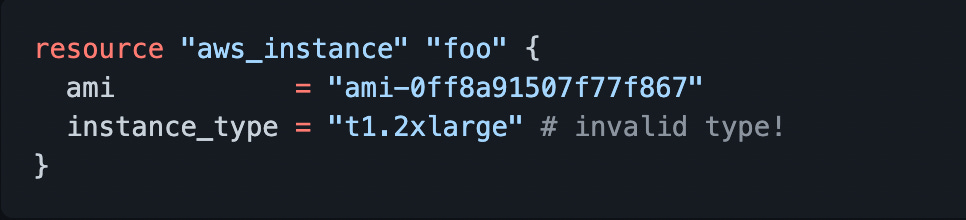
E.g. Let’s imagine that you provided an incorrect EC2 instance type when provisioning an EC2 instance with Terraform.
E.g. By running “tflint” you will be able to identify the issue beforehand.
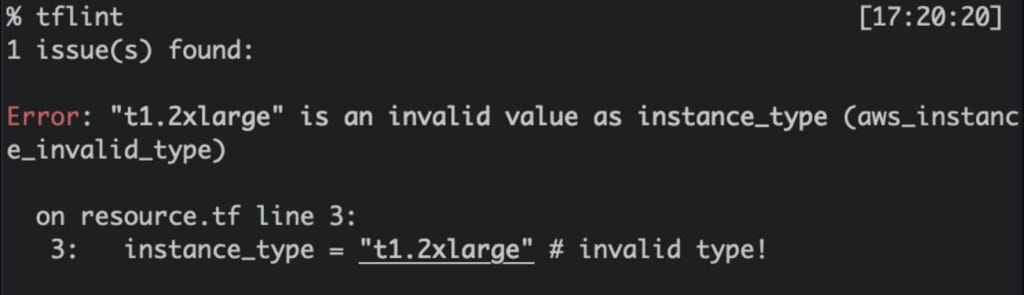
TFLint also supports multiple output formats, including console, JSON, and JUnit XML.
Popular Use Case
TFLint is commonly used in CI/CD pipelines to catch issues early in development. It helps developers to identify invalid configurations of cloud resources and adhere to best practices. In addition to that, TFLint can also be integrated into code review processes, providing developers with immediate feedback on potential issues and allowing them to address problems before merging code.
2. Infracost

Infracost is an open-source tool for estimating the cost of cloud infrastructure using Infrastructure as Code templates.
It integrates with popular Infrastructure as Code frameworks like Terraform. It enables developers to quickly estimate the cost of their infrastructure changes before deploying them.
Infracost supports multiple cloud providers like AWS, Azure, and Google Cloud and provides detailed cost breakdowns for each resource in the infrastructure stack.
It also allows developers to make informed decisions about the cost implications of their infrastructure changes and ensure they stay within their budget.
Features of Infracost
Offers multi-cloud support such as: AWS, Azure, and Google Cloud Platform.
It provides a detailed breakdown of costs for each resource in the infrastructure stack, including usage and pricing details.
Popular Use Case
Infracost is valuable for project teams to identify the cloud cost of the changed infrastructure ahead of the time. It allows the development team and the product managers to make informed decisions by reviewing the cost of the infrastructure changes before it’s deployed to the cloud.
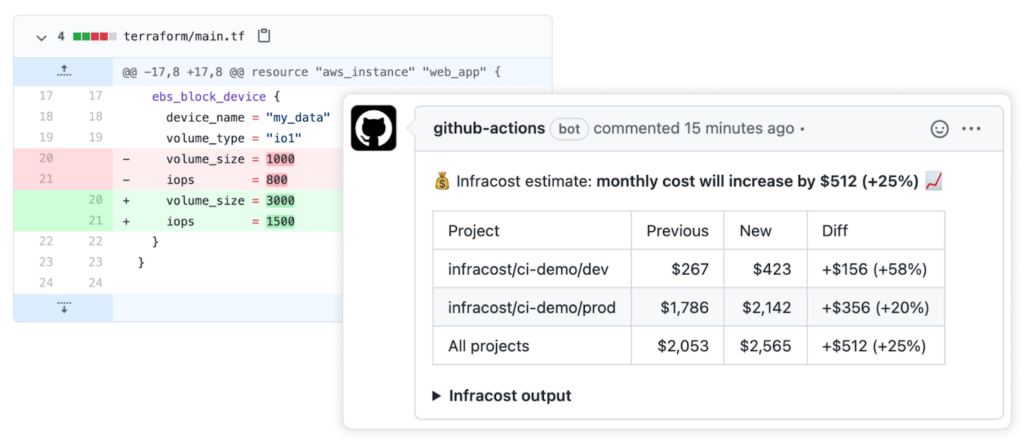
For example, you can connect Infracost with GitHub and once a PR is made with infrastructure changes, you can view the breakdown of the infrastructure cost change.
Look at the following example of the post cost estimates in pull request that is supposed to update the volume size and the iops of an EBS volume.
3. Checkov
Checkov is an open-source static code analysis tool for Infrastructure as Code frameworks like Terraform, CloudFormation, and Kubernetes. It helps developers and DevOps teams identify and fix misconfigurations and security risks in their infrastructure code before deployment.
It uses a rules engine to scan Infrastructure as Code files and detect potential issues, such as security vulnerabilities, compliance violations, and best practice violations. Its simple syntax and extensibility make it easy for users to add rules and customizations.
Features of Checkov
Sizeable built-in library of rules.
Checkov’s rules engine can be easily extended to add custom rules.
It enables collaboration and sharing of custom rules and configurations between team members or across organizations.
Popular use case
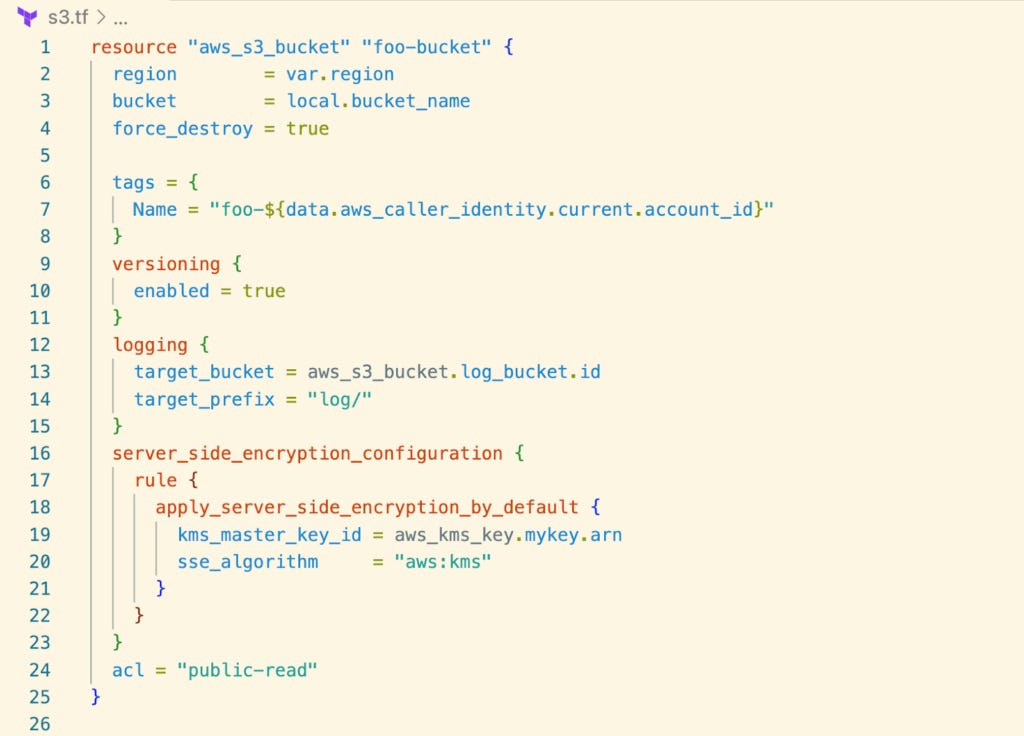
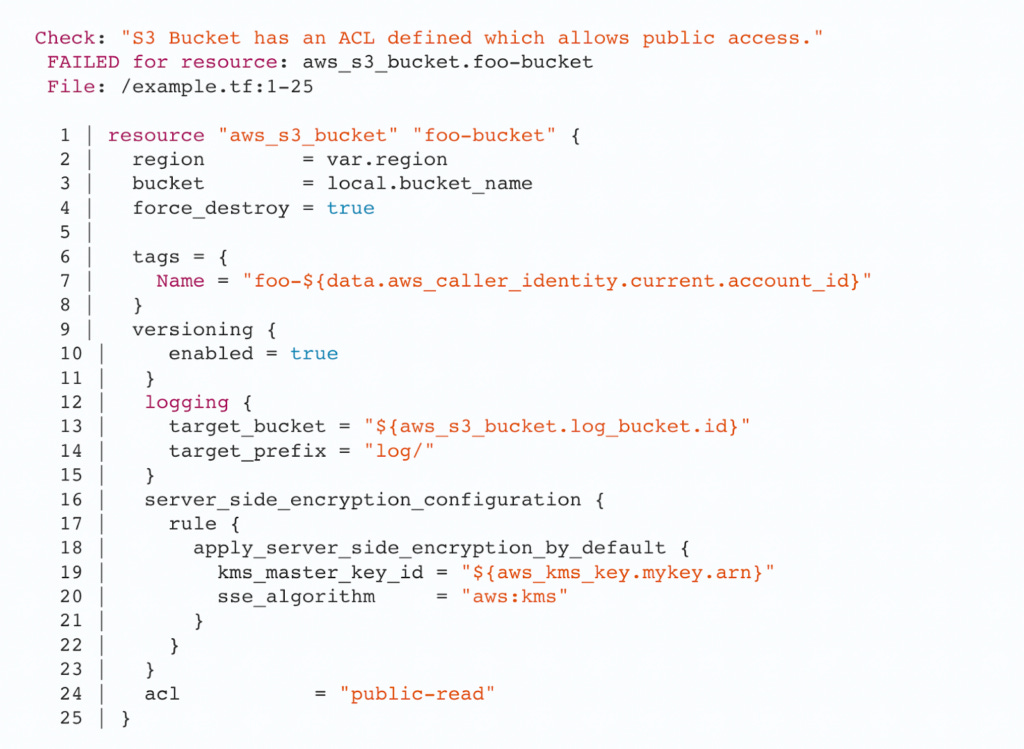
The following example shows how Checkov CLI can be used to scan the terraform configuration of a S3 bucket and identify noncompliances.
The below image shows the S3 bucket resource declaration with S3 access control list(ACL) set to “public-read” that allows anyone to read the bucket content which is not recommended by AWS.
Checkov identifies this configuration as non-compliant and shows the following scan output.
4. TFSEC
TFSec is an open-source tool for scanning and detecting potential security vulnerabilities in Terraform code in both HCL and JSON.
It analyzes the Terraform code and compares it against predefined security rules. These rules cover areas such as data privacy, network security, and access control. If TFSec detects any potential security issues, it will provide detailed feedback and suggestions for resolving them. This can help developers and security teams ensure their infrastructure code is secure and compliant before being deployed to production environments.
Features of TFSec
You can define custom rules based on the organization’s specific security requirements.
It can be integrated into CI/CD pipelines to automate security scanning.
Provides detailed feedback on potential security issues, solutions, and guidance on remediating any detected problems.
Popular use case
TFSec is widely used to perform security scans before deployment to ensure that the code meets the organization’s security requirements and adheres to best practices.
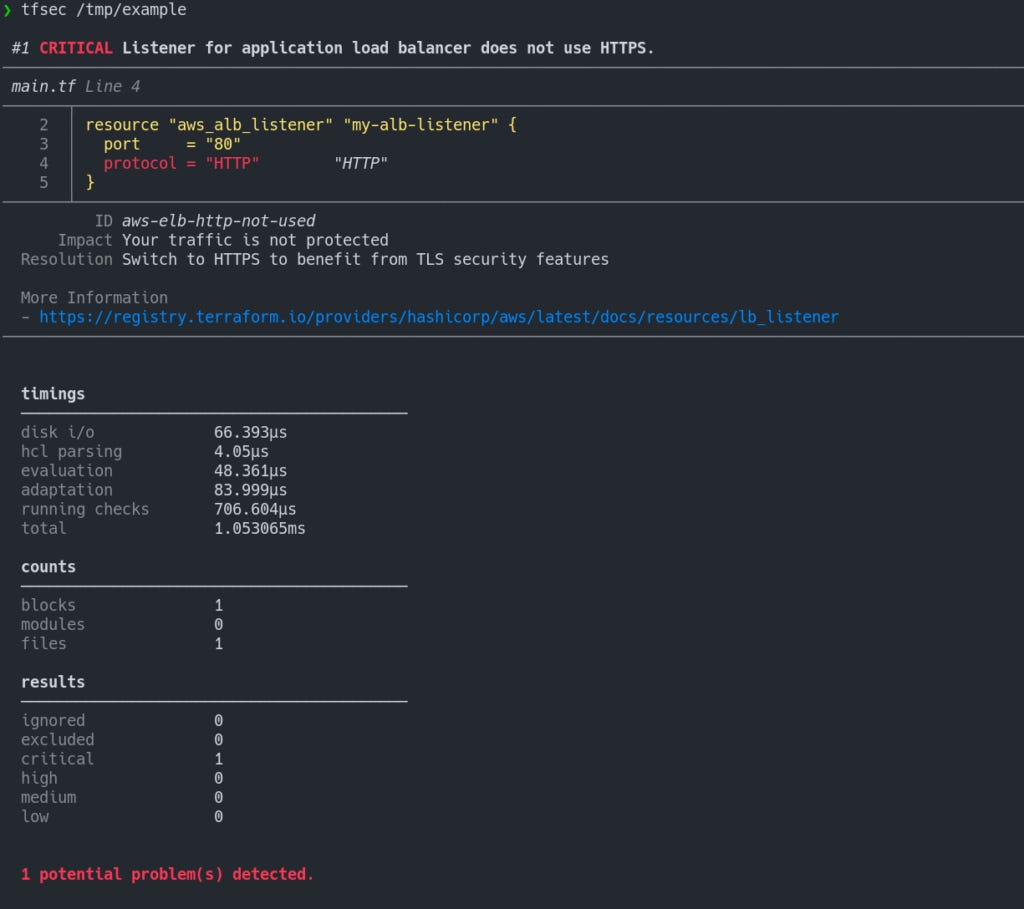
Look at the following output of TFSec where it identifies the security vulnerability of using “HTTP” protocol instead of “HTTPS” for Terraform ALB configuration.
5. Regula
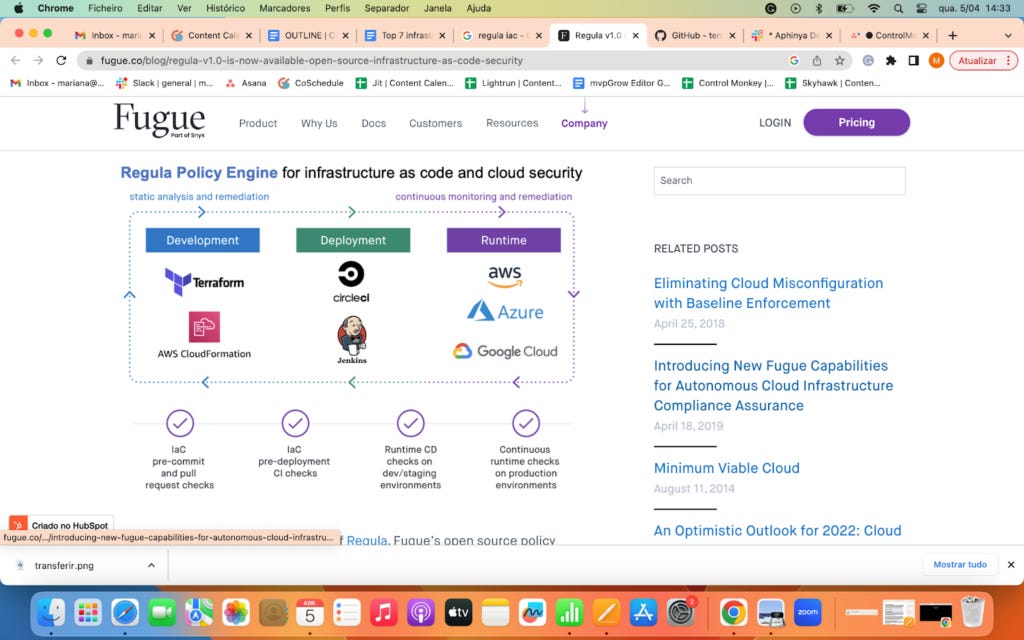
Regula is an open-source tool that scans Infrastructure as Code files for potential security vulnerabilities and compliance violations. It supports various Infrastructure as Code formats, including Terraform, CloudFormation, Kubernetes YAML, and Dockerfile, and checks them against predefined policies and compliance standards.
It can help security and compliance teams to identify security gaps and non-compliant configurations in their Infrastructure as Code files early in the development lifecycle, thereby reducing the risk of security incidents and non-compliance issues.
The tool is highly customizable, allowing users to define their policies and compliance standards. You can integrate it with Continuous Integration/Continuous Delivery (CI/CD) pipelines to automate Infrastructure as Code scanning and compliance checks.
Features of Regula
Checks Infrastructure as Code files against predefined policies and compliance standards, including CIS, NIST, and HIPAA.
Users have the flexibility to define their own policies and compliance standards.
Provides detailed feedback, including suggested fixes and guidance on remediating any detected problems.
Popular use case
Regula provides tools for writing rules (policies) against resources. This way, users can identify vulnerabilities in Infrastructure as Code files that may compromise security.
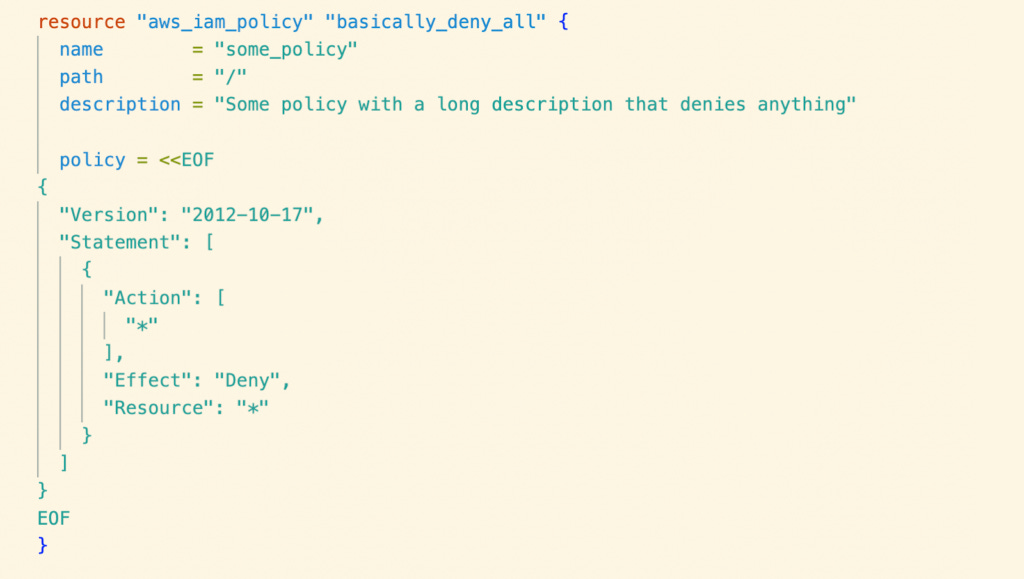
Look at the following example terraform script(main.tf) which is going to provision a IAM policy with wildcard “Action” and “Resource”.
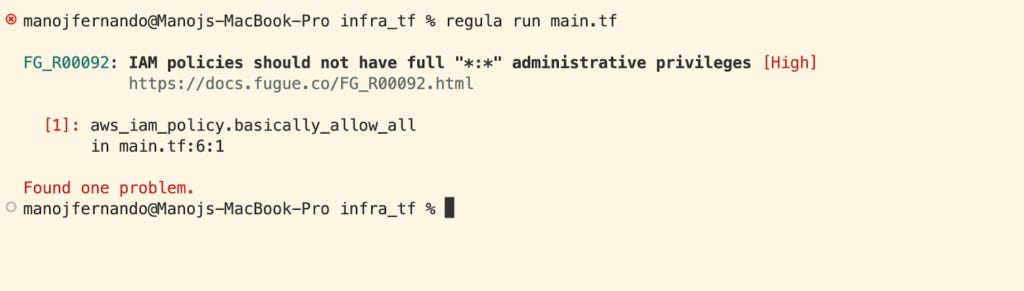
When we run “regula run main.tf” it has used Fugue Rule Set (Fugue Rule Set includes CIS benchmarks for AWS, Azure, and Google Cloud Platform, as well as rules for other compliance frameworks) to identify any compliance issues.
The detected ones are flagged and reported like the following output.
6. Terraform-docs
Terraform-docs is a command-line tool that generates documentation for Terraform modules in various output formats. It parses the input Terraform files, extracts documentation comments, such as descriptions of resources, variables, and outputs, and organizes them in a structured format.
Terraform-docs can generate documentation in several formats, including Markdown, JSON, and YAML. The tool allows customizable templates and creates documentation for individual modules or projects. It will enable developers to maintain up-to-date and consistent documentation for their Terraform projects, making it easier for other team members and stakeholders to understand and use the infrastructure.
Look at the following example with the comments added to the terraform file .
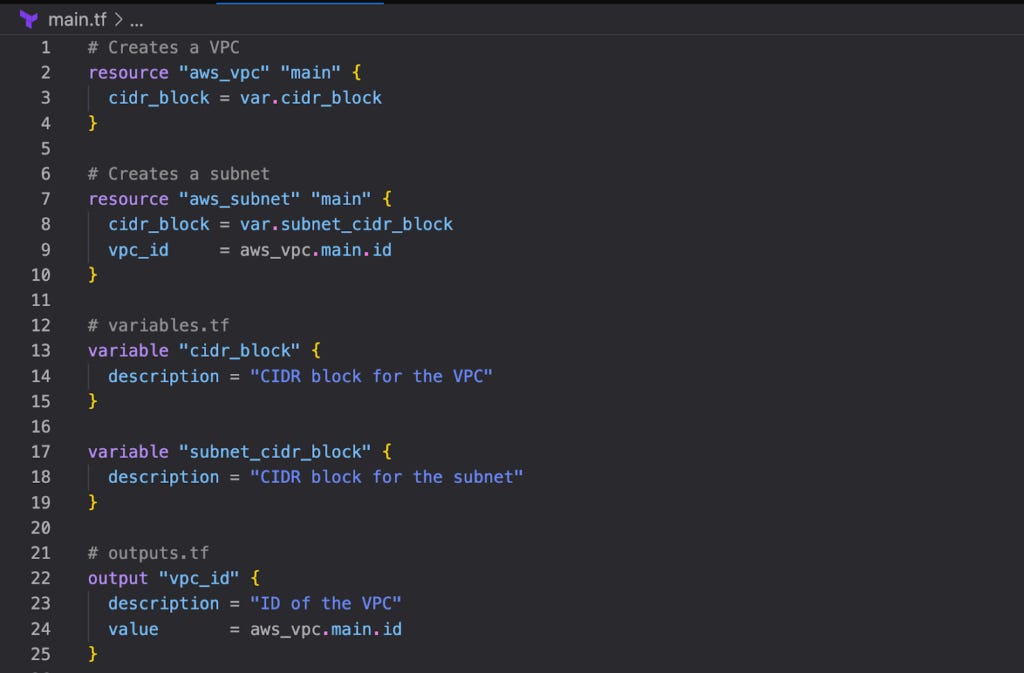
In order to generate the documentation you can issue the following command to generate the documentation in the README.md file.
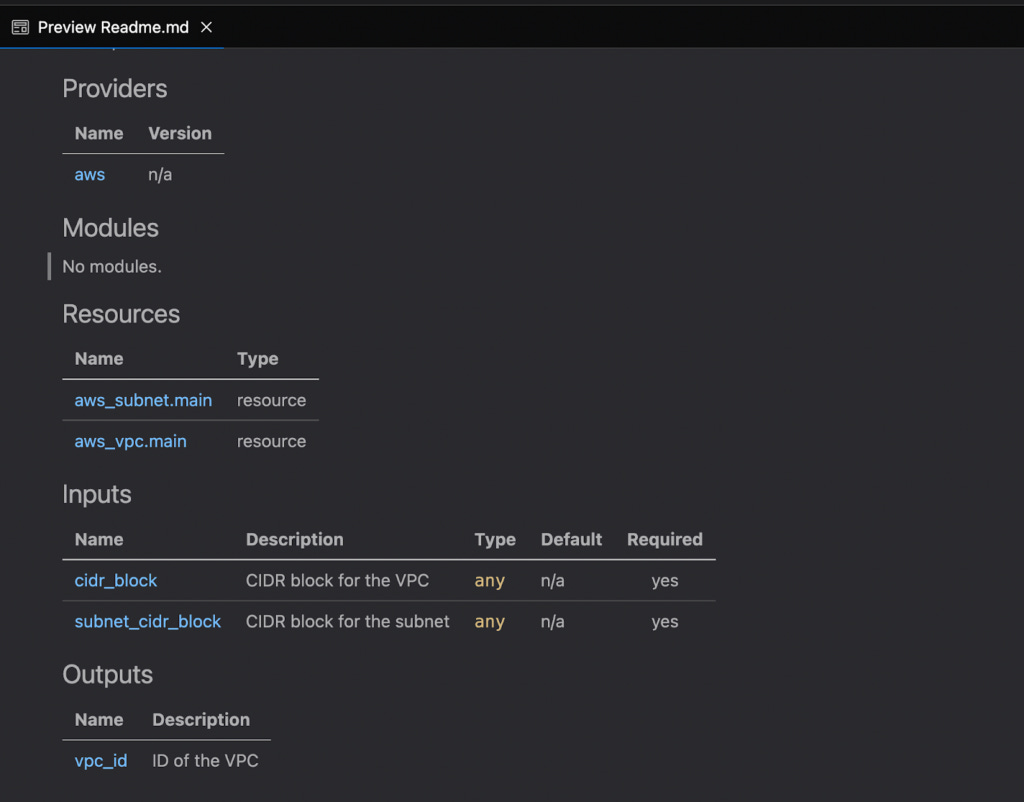
terraform-docs markdown ./ > README.md
The following is the preview of Markdown in README.md.
Features of Terraform-docs
The tool supports multiple versions of Terraform, making it easy to use with both legacy and newer Terraform codebases.
It can be integrated with CI/CD pipelines to automatically generate and publish documentation whenever changes are made to the codebase.
Terraform-docs can automatically generate a table of contents (TOC) based on the generated documentation, making it easier for users to navigate.
It is cross-platform and works on Windows, Linux, and macOS.
The tool allows for customizable templates, so you can tailor the generated documentation to your specific needs.
Popular Use Case
Organizations typically incorporate Terraform-docs into their CI/CD pipeline, enabling the automatic generation and publication of documentation whenever changes are made to the codebase. This ensures that documentation is always up-to-date with the infrastructure code.
7. Terratest

Terratest is an Infrastructure as Code tool that helps automate infrastructure testing, allowing developers to catch errors early in development.
Using Terratest, developers can write tests that validate their infrastructure code and ensure it behaves as expected, leading to faster and more reliable deployments.
Features of Terratest
It includes end-to-end, unit tests, static analysis, and error handling tests.
It works with IaC code written in Terraform, Packer, and Docker.
It also works with Amazon (AWS), Google Cloud, and Kubernetes.
Popular use case:
Terratest is ideal for making code more testable.Look at the following example of testing the simplest Terraform module ever with Terratest.
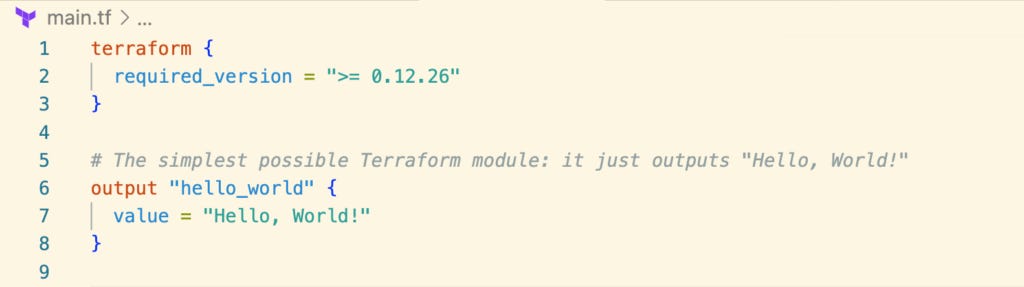
Terratest uses Go as the programming language to write tests against the Infrastructure as Code. If you are familiar with Go, you can easily write tests with Terratest. Look at the following test for the above terraform module.
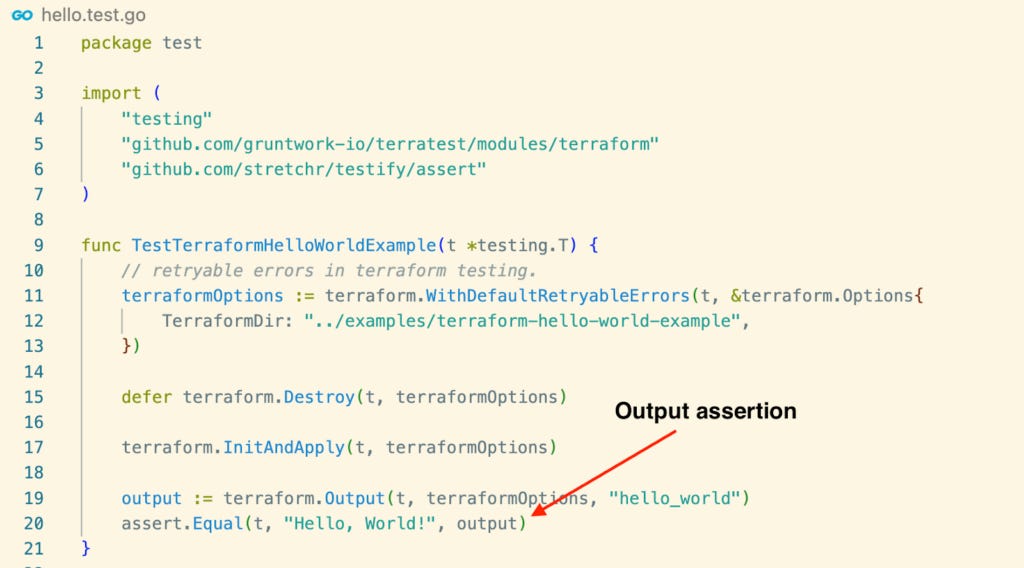
Additionally, Terratest can be integrated with other Infrastructure as Code tools to create a seamless and automated infrastructure deployment pipeline.
Summary
In today’s world, infrastructure management is critical for businesses but can also be time-consuming, resource-intensive, and risky. Infrastructure as Code provides a way to automate and manage infrastructure more efficiently, securely and fit to scale.
Infrastructure as Code Open-source tools (like those we shared earlier) must be included in the CI/CD pipeline for maximum value and efficient usage. However, integrating, configuring, and maintaining these tools in the CI/CD pipeline involves much manual work, which beats the purpose of IaC. You would also need to build some kind of ruling mechanism that defines when to fail your builds when certain conditions are not being met.
ControlMonkey CI/CD super-pipeline integrates with multiple Infrastructure as Code open-source projects, enabling you to define smart conditions on those tools’ outputs to block non-compliance and costly changes that find their way to production.
Sign up for free to discover how Control Monkey can help your business streamline infrastructure management.